One widget per person, group, or everyone
Place as many as you like. Each one follows whoever you point it at, with their caption and song under the photo.
What else it does
Live photo widget
Put your best friend’s, partner’s or group’s latest photo on your Android home screen. It updates by itself when they send one. Free on Google Play.
Front and back camera
Take a photo with your front and back camera at the same time and send it to your close friends. Plus a daily DuoShot prompt you both answer together.
Disappearing photos
Send a photo that disappears from your friend’s inbox after 24 hours. Private, invite-only, no stories and no public feed. Free disappearing photos app.
Photo streaks
Send each other a photo every day and keep your streak going. Missed a day? A streak freeze brings it back. Free photo streak app for Android.
Songs on photos
Add a song to your photo before you send it. Your friend hears a preview when they open it, and sees the song on their widget. Free on Android.
For couples
Pick each other as your person. Get a widget with their photos, a daily question, DuoShot, and dates you count down to. Free couples photo app for Android.
For you and your person
Pick each other as “your person”. It only counts when both of you choose. Then you get a question every day, DuoShot, and a countdown to when you next meet.
Your friends see what you’re up to, too. Set “Playing Valorant” or “At the gym” and it sits on your avatar for an hour, a few hours or the day.
How couples use DuoFrame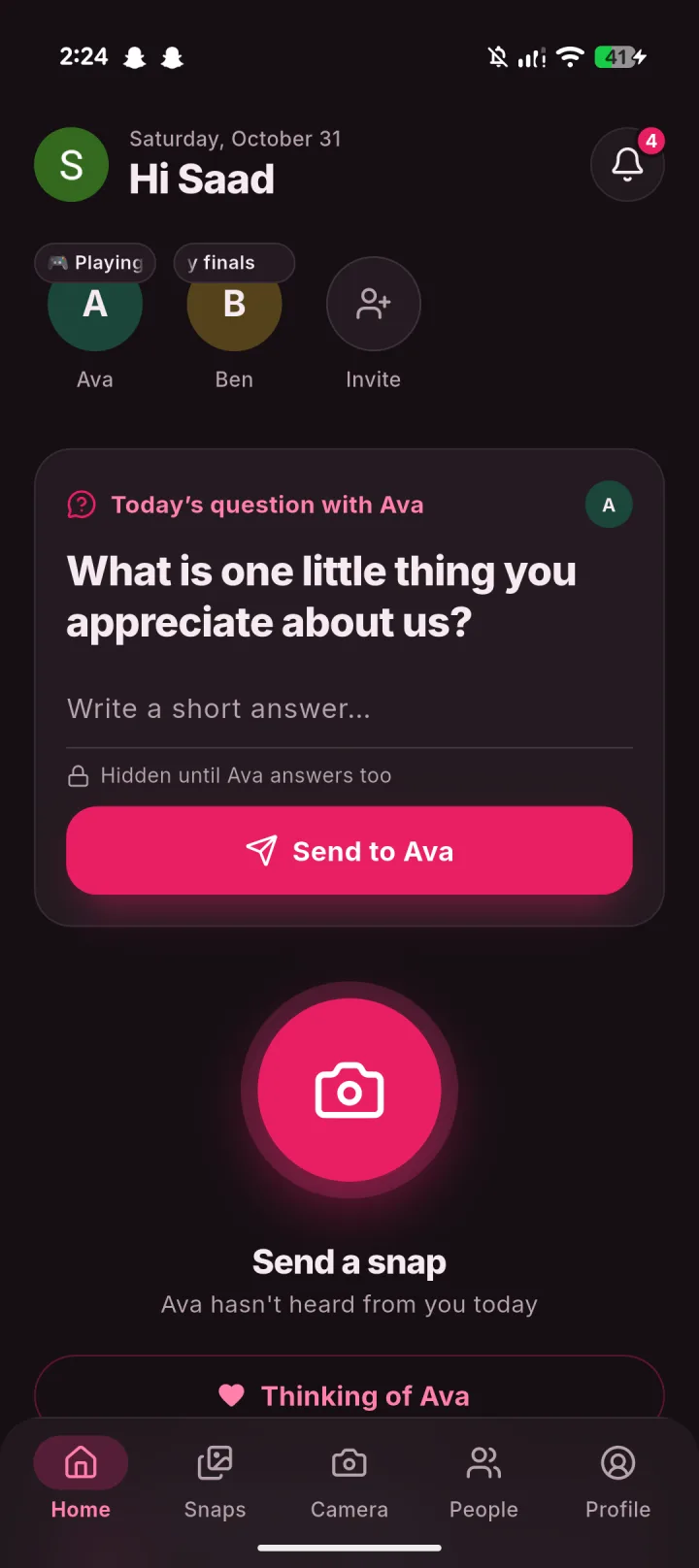
Questions
What is DuoFrame?
An Android app for sending photos to your close friends, partner and family. Their latest photo shows up in a widget on your home screen. There is no public feed, no stories and no strangers.
How is it different from Snapchat, BeReal or Locket?
It keeps the parts people like: disappearing photos, streaks, front and back camera shots and a home screen photo widget. It leaves out stories, Discover, maps, public profiles and suggested friends. Only people you invite can send you photos.
Is DuoFrame free?
Yes. Photos, clips, songs, groups and widgets are free. Some screens show a small ad.
How long do photos last?
One-to-one snaps disappear 24 hours after they are sent. You can keep one on a friend’s widget until your next photo, and photos sent to a group stay with the group.
How do I find friends who already use DuoFrame?
Allow access to your contacts and DuoFrame shows who is already here, matched by email or phone number. Only scrambled versions leave your phone. Everyone else you can invite on WhatsApp.
Does it work on iPhone?
Not yet. DuoFrame is on Android through Google Play.
Guides
- How to take a photo with the front and back camera at the same time on Android
Most Android camera apps make you pick one camera. Here is how to capture both at once, which phones can run them together, and what to do if yours cannot.
- How to keep a photo streak going with your best friend (and get one back)
What counts toward a streak, why streaks break when you were sure you sent something, and how a streak freeze brings a broken one back.
- See what your friends are up to right now, without a feed
Set a status like “Playing Valorant” or “At the gym” that your close friends see on your avatar, and that clears itself after an hour, a few hours or the day.
- 60 daily questions for couples (light, deep and long-distance)
Questions to ask your partner one a day: easy ones for busy days, deeper ones for weekends, and some made for long-distance couples. Answer in a line or a photo.
- 40 photo ideas to send your partner when you have nothing to say
Good morning photos, cute everyday pictures and small surprises to send your boyfriend or girlfriend, without posing or posting anything.
- 30-day photo challenge to do with your friends
A photo a day for a month, with one prompt per day. Easy enough for busy weeks, and more fun when your friends do it with you.
- Long-distance relationship: habits and apps that actually help
What keeps long-distance couples close day to day: small shared routines, a countdown, photos on each other’s home screens, and knowing when the other is free.
- How to share photos with family privately on Android (no social media)
Ways to share everyday photos with parents, grandparents and siblings without posting them publicly, and how to get them onto a family member’s home screen.